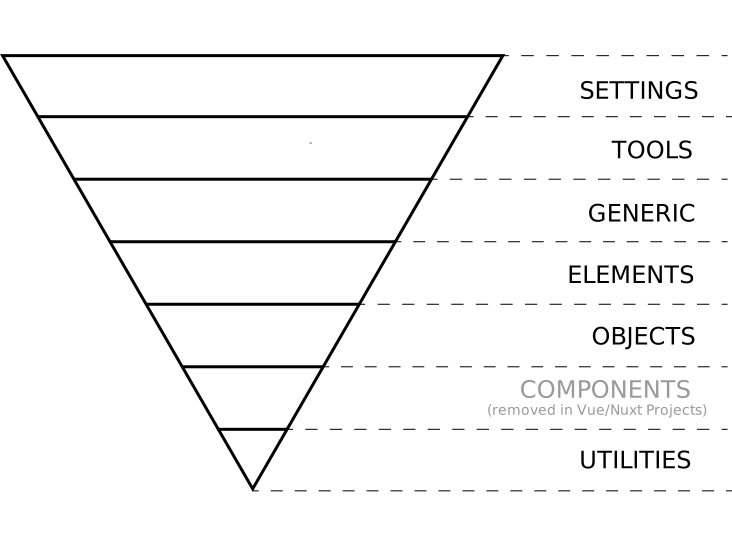
The styles folder consists of 6 subfolders following the paradigm of Inverted Triangle CSS (ITCSS). This is the place where you can define your global settings and styles that need to be available app-wide.
nuxt-starter/
    /assets/
        /styles/
            /1_settings/
            /2_tools/
            /3_generic/
            /4_vendors/
            /5_elements/
            /6_objects/
            /7_utils/
            styles.scss
2
3
4
5
6
7
8
9
10
11
# Why ITCSS?
Because it works! 😃 It works for large-scale projects and for small projects as well. It provides a consistent, comprehensible, scalable and maintainable way to write CSS. It organizes CSS Files to deal with CSS specifics like global namespace, cascade and selectors specificity and it divides sass only definitions from definitions that generate real CSS code. The triangle also shows how styles represented by selectors are ordered in the resulting CSS: from generic styles to explicit ones, from low-specificity selectors to more specific ones.
# What are the layers?
- Settings – used with preprocessors and contain font, colors definitions, etc.
- Tools – globally used mixins and functions. It’s important not to output any CSS in the first 2 layers.
- Generic – reset and/or normalize styles, box-sizing definition, etc. This is the first layer which generates actual CSS.
- Elements – styling for bare HTML elements (like H1, A, etc.). These come with default styling from the browser so we can redefine them here.
- Objects – class-based selectors which define undecorated design patterns, for example transition classes.
Components – specific UI components.This layer is removed in Vue/Nuxt apps in favor of writing Vue Single File Components.- Utilities – utilities and helper classes with ability to override anything which goes before in the triangle, eg. hide helper class